

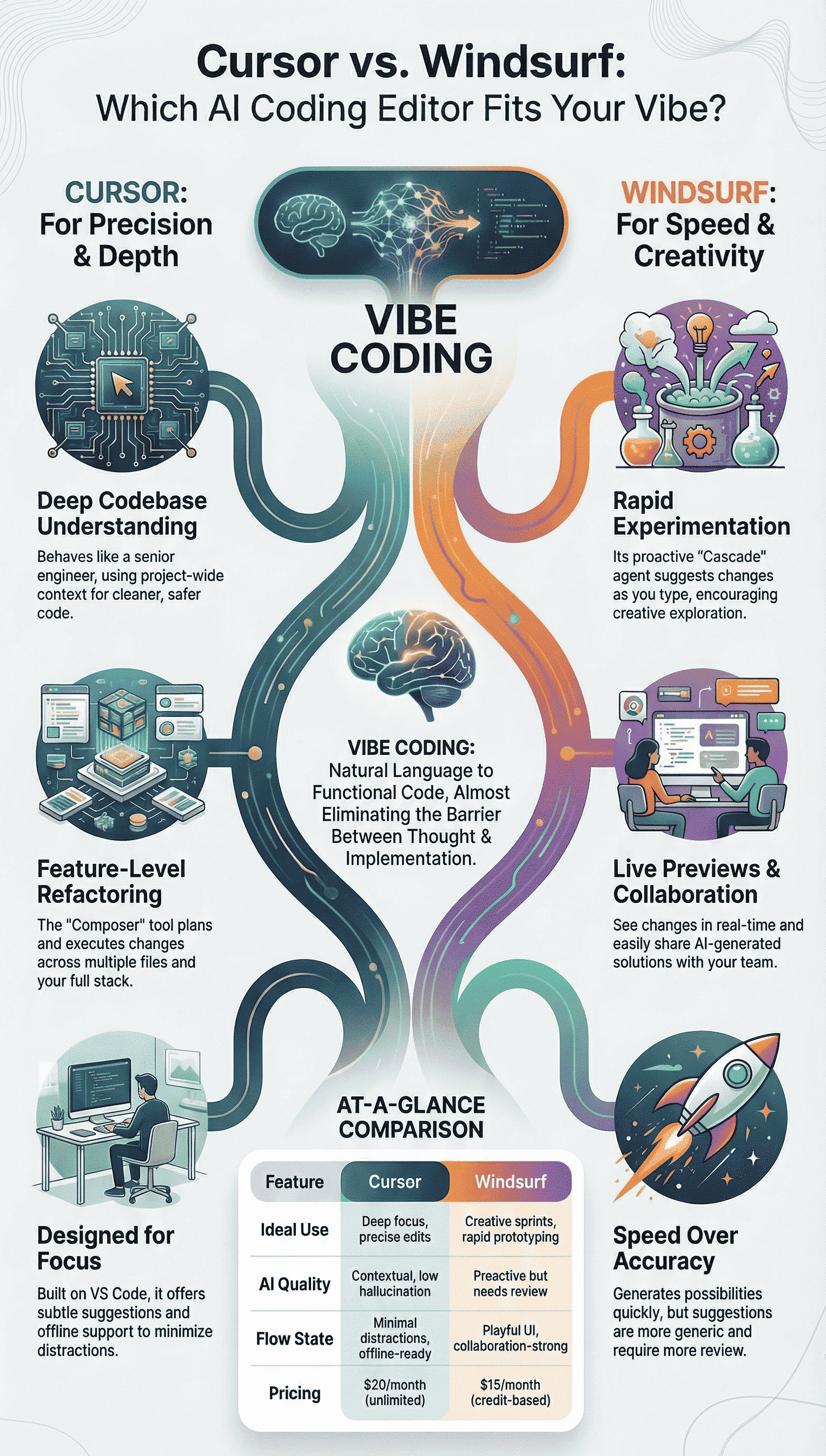
Cursor is the better choice if you care about truly understanding and scaling your codebase, not just getting quick answers. It behaves like a senior engineer who remembers past decisions, patterns, and tradeoffs, and then uses that context to help you design cleaner, safer systems.
Rather than just generating snippets, it supports deep refactors, multi-file changes, and secure coding by actually following the logic of your project.
If you’re building serious products or long-lived services, Cursor will likely fit your workflow better than Claude’s editor, so keep reading to see how it aligns with your style of development.
Key Takeaways
- Cursor excels with deep codebase understanding and reliable multi-file edits using its Composer tool.
- Windsurf prioritizes rapid experimentation with proactive AI agents and live previews.
- Your choice depends on whether you value precision and focus (Cursor) or speed and creativity (Windsurf).
Understanding Vibe Coding and Why Your Editor Matters
Vibe coding isn’t just another buzzword. It’s that state where your natural language prompts transform directly into functional code, where the barrier between thought and implementation nearly disappears. You describe what you want in plain English, and the editor makes it happen across many files.
The right AI editor becomes an extension of your thinking process, especially as these tools are already part of many developers’ workflows,“76% of all respondents are using or are planning to use AI tools in their development process this year.” [1]
The right AI editor becomes an extension of your thinking process, especially when vibe coding workflows reduce friction between intent and execution, letting developers stay immersed instead of context-switching between tools. This is where editors designed for vibe coding feel fundamentally different from traditional IDEs.
The editor you choose determines how deeply the AI understands your project’s architecture. Some tools just look at the file you’re editing, while others comprehend your entire codebase, the libraries, the patterns, the idiosyncrasies that make your project unique. This context awareness separates superficial suggestions from transformative help.
We’ve found that the best vibe coding editors share three crucial qualities:
- They maintain your flow state instead of interrupting it
- They handle complex, multi-file changes reliably
- They integrate security awareness naturally
Cursor: When Precision and Depth Matter Most
Cursor feels familiar the second you open it because it sits on top of VS Code’s foundation, so your shortcuts, layout, and general muscle memory still work.
The shift happens when you actually start talking to your codebase. The AI doesn’t just stare at the current file, it pulls in your project structure, your imports, your shared utilities, even the way you tend to name functions. That kind of context memory quietly changes how you ship features.
How Cursor Understands Your Project
Cursor’s strength shows up most when your project stops being “a few files” and turns into a real codebase. It can:
- Follow references across many folders and layers.
- Respect your existing patterns and abstractions instead of fighting them.
- Remember earlier design choices so new code fits the same style.
So when you ask it to update an API, refactor a module, or trace a bug, it’s not guessing in the dark. It’s working with a map of your project, not a snapshot.
Composer: Vibe Coding for Real Features

The Composer tool feels less like “generate some code” and more like planning a feature with a teammate. When you write a prompt like “build a user authentication system with JWT tokens,” Composer doesn’t stop at one file.
This kind of experience reflects how modern tools and editors are evolving to support intent-driven development, where the editor helps orchestrate structure, wiring, and consistency instead of just emitting snippets.
That’s why choosing the right editors becomes part of how well vibe coding actually scales beyond prototypes. It breaks the work across your stack in a way that actually matches how you’d build it:
- Route handlers for signup, login, refresh, logout
- Middleware for auth checks and token verification
- Config files for secrets, token lifetimes, and environments
- Database migration scripts for users, sessions, or refresh tokens
Composer is thinking at the feature level instead of just filling in one function. That’s where the depth really shows, especially when you’re stitching together backend, middleware, and database logic in one pass.
Staying in Flow, Not Fighting the Editor
Long coding sessions are where Cursor feels different. The AI suggestions come in when they’re useful, but they don’t constantly pull your attention away or drown the editor in noise. You still feel like you’re driving.
Two details stand out here:
- Subtle suggestions that support refactors and edits without taking over your screen.
- Offline support that lets you keep momentum when the connection drops, during flights, spotty café Wi-Fi, or just bad reception at home.
The result is a tool that respects focus. It helps, but it doesn’t hover.
Ideal Use Case: Building a Complex Dashboard
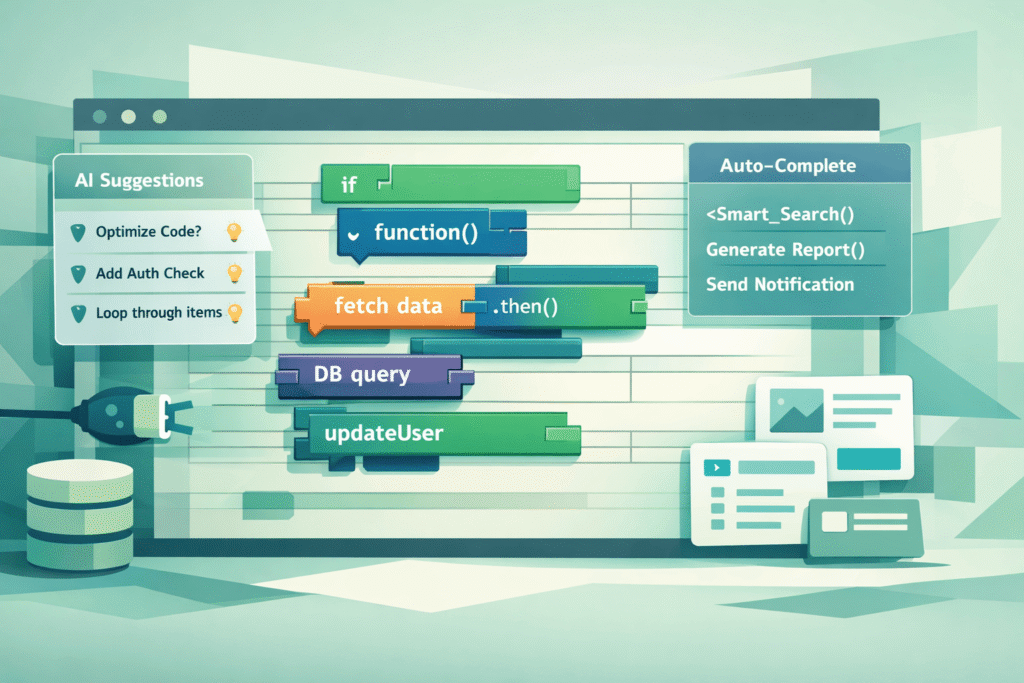
Let’s say you’re creating that hydroponics monitoring system. Your prompt might be: “Create a dashboard that shows real-time sensor readings for temperature, pH, and nutrient levels with historical graphs.”
With Cursor, the workflow looks like this:
- The Composer analyzes your existing project structure
- It creates new components for each sensor type
- It sets up the data fetching hooks from your API
- It generates the chart components with appropriate libraries
- It even suggests the utility functions for data normalization
The result isn’t just code, it’s a coherent feature that fits your architecture.
Windsurf: For When Speed and Creativity Lead
Windsurf takes a different approach to vibe coding. Its Cascade agent proactively suggests changes across many files before you even finish typing your idea.
There’s an energetic, almost playful feeling to the interface that encourages experimentation. The live previews let you see changes in real-time as the AI suggests them.
The collaboration features stand out if you’re working on a team. Windsurf makes it easy to share AI-generated solutions and iterate together.
The UI feels more modern and visually engaging than Cursor’s VS Code foundation, which some developers prefer for creative projects.
Where Windsurf sometimes falters is in consistency. The proactive suggestions can feel brilliant one moment and completely off-base the next.
You’ll spend more time reviewing and correcting compared to Cursor’s more measured approach. The visual elements, while polished, can become distractions during long coding sessions.
The Trade-Off: Speed Versus Accuracy
Windsurf’s strength lies in its ability to rapidly generate possibilities. When you’re brainstorming a new feature or prototyping different approaches, the Cascade agent can produce many variations quickly.
This is valuable during the early stages of development when you’re exploring directions rather than implementing precise solutions.
Yet, this speed comes with a cost. You’ll notice that Windsurf’s suggestions tend to be more generic, less tailored to your specific codebase conventions. The AI seems optimized for breadth rather than depth, which works well for greenfield projects but less so for complex existing codebases.
Direct Comparison: Where Each Editor Shines
This table breaks down the practical differences you’ll experience day-to-day:
| Feature | Cursor | Windsurf |
| Vibe Coding Fit | Deep focus, precise edits, Composer | Creative sprints, Cascade for multi-file automation |
| AI Quality | Contextual, low hallucination, doc-aware | Proactive but needs review, UI previews |
| Flow State | Minimal distractions, offline-ready | Playful UI, collaboration-strong |
| Pricing (Pro) | $20/month, unlimited tab/agent | $15/month, 500 credits |
The pricing difference reflects their different approaches. Cursor’s unlimited usage suits developers who live in their editor all day. Windsurf’s credit system works better for those who use AI assistance more sporadically or for specific tasks.
Navigating the Challenges of AI-Assisted Coding
AI-assisted coding comes with real advantages, but it also brings a new set of tradeoffs you can’t ignore. Both editors share the same core problem: they’re confident, even when they’re wrong.
hat confidence matters because, while AI can speed routine work, controlled studies show measurable productivity gains that must be balanced with review overhead, for example, one controlled experiment found the treatment group “completed the task 55.8% faster than the control group” when paired with an AI pair programmer. [2]
Many of the problems vibe coding solves, speed, reduced cognitive load, faster iteration, also introduce new failure modes if context or assumptions drift. Understanding what vibe coding solves helps frame why deeper codebase awareness matters more than raw generation speed.
Hallucinations, code that looks reasonable but fails in practice, show up in both tools. Cursor’s deeper project awareness does cut down how often this happens, especially on larger, well-structured codebases, but it doesn’t remove the risk.
You still have to read every change with a critical eye, especially anywhere security or data handling is involved.
Security Risks You Can’t Handwave Away
Speed is where AI shines, and also where it quietly adds risk. When code is generated in seconds, it can skip the small defensive checks a human would normally add by instinct. Over time, that can stack up into real vulnerabilities.
Some practical guardrails help here:
- Keep automated security scanners (SAST/DAST) in your pipeline.
- Treat AI-generated code like code from a new teammate: review it line by line.
- Be extra cautious around auth, crypto, payments, and input validation.
The key is not to assume that because the code compiles, it’s safe. Compilation isn’t the bar. Security review is.
Skill Erosion and Staying Sharp
There’s also the quieter problem: skill erosion. If you let the model solve every bug, write every query, and design every pattern, your own problem-solving muscles get less use.
You might ship faster this week but feel lost months later when the tool gives you a bad answer. A hybrid workflow tends to work best:
- Use AI for:
- Boilerplate
- Repetitive wiring and glue code
- Mechanical refactors
- Handle yourself:
- Core architecture
- Performance-sensitive paths
- Security-critical logic
- Design decisions that shape the system long-term
You stay fast on the boring parts, while still doing the real thinking on the parts that define the quality and safety of your system. That balance keeps AI as a power tool, not a crutch.
Making Your Choice: Which Editor Fits Your Vibe
Choose Cursor when you need deep understanding of existing codebases. If you work primarily on large, complex projects where consistency and architecture matter, Cursor’s contextual awareness will save you time and frustration. The precision it offers makes it ideal for production-level work.
Choose Windsurf when creativity and speed are your priorities. If you frequently prototype new ideas or work on greenfield projects, Windsurf’s proactive approach and visual feedback will speed up your experimentation. The collaborative features make it strong for team environments.
Consider your working style too. If you prefer minimal interfaces and long, focused coding sessions, Cursor’s VS Code foundation will feel natural. If you thrive on visual feedback and rapid iteration, Windsurf’s modern interface might keep you more engaged.
FAQ
What is a vibe coding editor and how does it support flow state coding?
A vibe coding editor focuses on keeping attention and momentum. It uses AI code generation, natural language prompts, inline completions, and fast autocomplete to reduce friction.
Features like codebase context, chat codebase, and automated suggestions help maintain flow state coding. The goal is a human AI partnership where tools assist without taking full control from the developer.
How do AI editors like Cursor AI IDE and Windsurf code tool handle large codebases?
Tools like Cursor AI IDE and Windsurf code tool scan repo understanding using explicit context Cursor or implicit context scan.
They support multi-file edits, project wide edits, and large repo handling. Context RAG Windsurf and semantic awareness help the AI reason across files. This allows safer code refactoring, faster debugging, and clearer code diff review.
What features matter most when choosing the best editor for vibe coding?
Key factors include response time speed, inline code diffs, manual control editing, and multi-line completion.
Power user features like custom rules context, notepads Cursor, and VS Code extensions help advanced users. Beginner friendly IDE design and learning curve IDE also matter. A balance between automated suggestions and manual edits keeps focus strong.
How do agentic workflows and natural language prompts change coding habits?
Agentic workflows let developers describe intent using natural language prompts and voice prompt coding.
Tools then plan steps like feature decomposition, iterative refinement, and step by step workflow. This conversational dev flow supports rapid prototyping and hybrid coding skills. Developers still review outputs, debug AI outputs, and guide the process toward production ready code.
What risks should developers consider when using AI editors for vibe coding?
AI editors raise concerns around privacy data sharing, vulnerability risks, and skill erosion risks. Features like offline AI editing, security code scans, and ethical AI coding help reduce issues.
Developers should watch bias mitigation dev and review automated suggestions carefully. Maintaining strong fundamentals ensures AI support improves work without replacing human judgment.
Your Vibe Coding Journey Starts Here
Some tools impress you with features, but the real test is whether they disappear while you code.
Try Cursor first: import your VS Code settings, then hit it with a real prompt from your project that spans many files. See how well it tracks context and your patterns.
Then give Windsurf that same prompt and compare how it reasons, explains, and rewrites.
Pick what keeps you focused, not passive. Vibe coding should feel like pairing, not outsourcing your judgment, especially when security matters.
To sharpen that judgment, join the Secure Coding Bootcamp.
References
- https://survey.stackoverflow.co/2024/ai
- https://arxiv.org/abs/2302.06590